This page contains the list of permissions used by Briar and a short explanation for each.
Status: Briar version 1.2.12
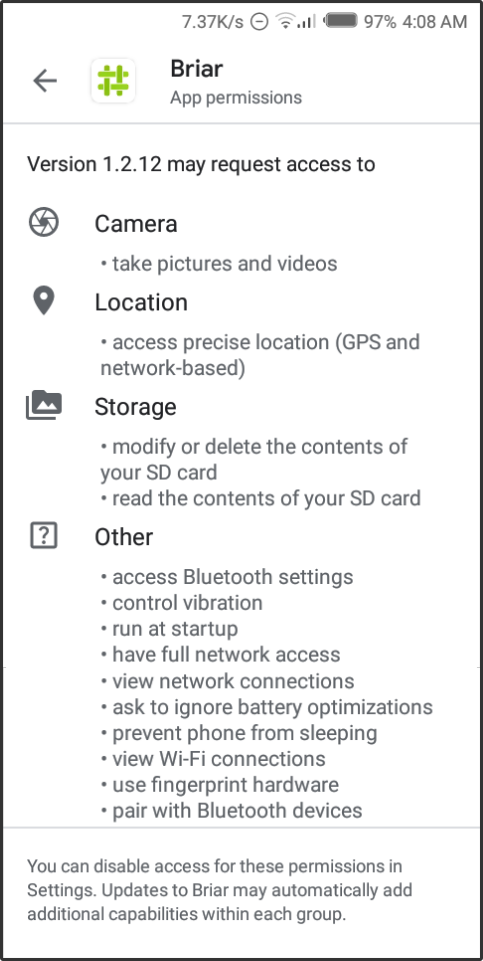
Briar only request permissions when they are needed: See !517
-
Camera<->android.permission.CAMERA
The camera is only used during the contact exchange to scan the qrcode. See Adding contacts. -
Location<->android.permission.ACCESS_COARSE_LOCATION
This permission is required on Android 6+ to discover other Bluetooth devices. Briar used a different approach for adding contacts in the past (via Bluetooth discovery), however this permission will most likely be removed in a future version because the current approach (via qrcodes) does not need Bluetooth discovery anymore. See ticket #223 -
Storage<->android.permission.WRITE_EXTERNAL_STORAGEThis permission allows Briar to write to external storage so as to store your account on your device's storage, since Briar doesn't use a central server. -
Access Bluetooth settings<->android.permission.BLUETOOTH_ADMIN
Briar needs this permission to turn on Bluetooth when adding contacts. See Adding contacts. -
Control vibration<->android.permission.VIBRATE
Required to add vibration support for notifications. -
Run at startup<->android.permission.RECEIVE_BOOT_COMPLETED
Briar needs this permission to receive a broadcast after the system finishes booting, so as to prompt the user to enter their password to log in. -
Have full network access<->android.permission.INTERNET
Required to establish a connection to the Tor network and to send messages via LAN. -
View network connections<->android.permission.ACCESS_NETWORK_STATE
Required to check if the phone is connected to a network (e.g. via WiFi or cellular network). We need to know when the phone establishes or loses a connection to the internet so we can enable or disable Tor accordingly. -
Ask to ignore battery optimizations<->android.permission.REQUEST_IGNORE_BATTERY_OPTIMIZATIONS
This permission asks the user to turn off battery optimizations, so as let Briar run in the background and receive messages. -
Prevent phone from sleeping<->android.permission.WAKE_LOCK
We need a wake lock to prevent the device from going to sleep because this would break the connection to the Tor network. -
WiFi connection information<->android.permission.ACCESS_WIFI_STATE
We are using the list of configured WiFi networks on the device to increase the entropy used for random data generation in [AndroidSecureRandomProvicer.java] (https://code.briarproject.org/akwizgran/briar/blob/master/bramble-android/src/main/java/org/briarproject/bramble/system/AndroidSecureRandomProvider.java). No information about those networks are leaked or used for any other purpose.
The permission is also used in the crash reporter to retrieve the local/LAN IP of the currently connected WiFi network. When Briar crashes an encrypted report can be transmitted via Tor to help us find the bug. You can choose which information are sent and exclude the IP address (untick CUSTOM_DATA in the crash reporter). -
Use fingerprint hardware<->android.permission.USE_BIOMETRIC
Required to unlock Briar using the fingerprint sensor when the App Lock feature is set up. -
Pair with Bluetooth devices<->android.permission.BLUETOOTH
Required to add contacts and send messages via Bluetooth. To read more about how Briar sends messages see How it works