According the figma file here, if a user interrupts the setup, a screen should be shown to them, see attachment
Setup = the 4 intro screens, then the do-not-kill-me fragment on the applicable devices and then displaying the QR code. After the briar app scans the QR code, display the Success 'Connected' screen ith the Finish button. Tapping on Finish button leads to mailbox status screen being shown to the user and that is a complete setup.
Notifications should be shown only after the 4 intro screens have been passed and the do-not-kill-me fragment has been shown to the user and the user has tapped 'Allow connections'
What does it mean to 'interrupt' the setup?
- Navigate back, back, back...
- Bring another app into the foreground before the Mailbox setup is complete (which means that mailbox would go into the background), then bring the Mailbox back into the foreground - when the user should see this screen? (test landscape and portrait
- double tap the 'Finish setting up the Briar Mailbox' line
- then again push the Mailbox into the background and bring it back into the foreground
- then finish the setup
Try this with interruptions at different points: during the display of the 4 onboarding screens, the do-not-kill-me fragment, and during the display of the QR code, during the progress screen being displayed etc
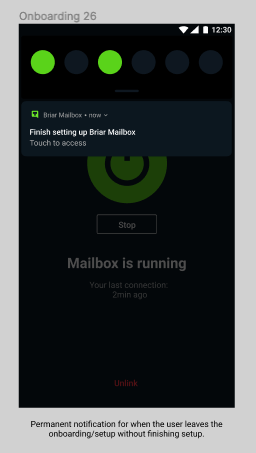
IN the current implementation the permanent notificaiton is not present - question in MM if this is OK. 24/6/22. Confirmed that this is all as expected.
28/7/22 - if I skip the intro and rotate, the Wiping Complete screen appears. I first went -> continue, then back to the first intro screen, then skip intro + rotate = wiping complete screen (Motorola E2)
28.11.2022 - retested using the same phone and the build 190e77813c891bf33ab45ed4a26db7f2f021c468 = OK
pixel 2 = OK as well