mirror of
https://code.briarproject.org/briar/briar.git
synced 2026-02-11 18:29:05 +01:00
Page:
stop mailbox
Pages
A Quick Overview of the Protocol Stack
Adding support for new architectures in Tor
Android Accessibility
Android Power Management
BDF
BSP
BTP
Blog Client
Blog Sharing Client
Client API Notes
Connect at a distance
Create Account
Design options for multi block messages
Development schedule for private message deletion
FAQ
Field Guide
Forum Client
Forum Sharing Client
Forums
Fundamental Problems
How Briar Connects to Contacts
Introduction Client
Mailbox Architecture
Mailbox Properties Client
Mailbox Scenarios
Mailbox cannot reach Briar
Messaging Client
Navigate away from sharing screen
Private Group Client
Private Group Sharing Client
Profile pictures
Quick Start Guide
RPC Notes
Release Test Plan
Roadmap
Self destructing messages tests
Software bill of materials for private message deletion
Sponsor 1
Testing
Translation Workflow
Transport Key Agreement Client
Transport Properties Client
add already added contact at distance
add contact after time out
add contact at distance one contact offline
add contact on biar received via hotspot
add contact whilst pending contacts
add nearby contact bluetooth off
add nearby contact that was already added at distance
add nearby contact then reconnect via BT
add nearby contact twice
app in background while do not kill me fragment displayed
application lifecycle
autostart mailbox on reboot when mailbox set up not completed yet
autostart mailbox on reboot when mailbox set up
blogs
bluetooth setup screen
briar connections opens from device view app settings
briar in background during sharing
briar mailbox test coverage
briar mailbox tests executed
cancel setup
changelog
code style
comparative test several devices location and wifi settings
connect multiple devices to hotspot
connect with nearby contact
create account on shared briar app
delete and recreate contact at distance
delete recreate nearby contact
deny briar access to location many times
deny briar access to location
development 101
development workflow
device offline warning
devices tested
disappearing messages sent to direct contacts
download app scan QR code
download type address manually
error handling mailbox uploads
feature workflow
first install do not kill me fragment
fresh install add contact distance reconnect via BT
fresh install add nearby contact BT reconnect BT
home
import somebody elses messages
install first time
interrupt scanning qr code
interrupt unlinking from briar side
introductions multiple contacts disapp msgs on off
invite multiple contacts to private group
location off during contact creation
mailbox in briar settings
mailbox is running
mailbox no internet
mailbox not reachable
mailbox notifications
mailbox onboarding screens scan QR Code
mailbox onboarding screens share link
mailbox strings translations
mailbox success screen
mailbox system clock in the future
mailbox system clock in the past
mailbox test coverage
mailbox wiping complete screen
main activity reset everything to initial state
make intro dis msgs on autodecline
make introductions disappearing messages on intro accepted
make introductions disappearing messages on intro declined by both
make introductions disappearing messages on intro declined by one
make introductions disappearing messages on
make introductions disappearing messages onoff intro accepted
make introductions disappearing messages onoff intro decl autodecl by both
manually change battery optimisation setting to ON
manually change battery optimisation setting to off
message upload both x and y have mailboxes
messages as expected no mailbox
messages removable media mailbox
messages uploaded Y knows x has mb
messages uploaded to mailbox correctly
mialbox not reachable
nearby contact
no mailbox autostart on reboot when QRcode scan canceled
no mailbox autostart on reboot when mailbox stopped by user
notes on testing
notification mailbox unreachable disappears after tapping
notification mailbox unreachable disappears when mailbox reachable
notification mailbox unreachable disappears when mailbox unlinked
notification mailbox unreachable
onboarding UI
open battery settings
open hotspot manually
open hotspot scan qr code
permissions
pre review checklist
private group invitations messages
product backlog
re add deleted contact reconnect via BT
reboot briar device after QR code scan
receive messages during contact creation
reconnect via BT when BT = OFF
reconnect via BT when Briar BT OFF and device BT OFF device location OFF Briar no access to location
reconnect via BT when Briar BT OFF and device BT OFF device location OFF
reconnect via BT when Briar BT OFF and device BT OFF
reconnect via BT
reimport imported messages
remove nearby devices permissions and start app
reopen mailbox after device goes to sleep
restart mailbox after wiping do not keep activities
rotate screen whilst adding contact at distance
scan incorrect qr code
scan qr code
scan valid QR code more than once
self destructing messages
share app briar access to location OFF
share app device location OFF
share app device wifi OFF
share app offline
share app wifi in briar OFF
signed commits
stop mailbox
stop sharing after download
stop sharing before download finished
threat model
time last connected
tor build process
tor port
transfer blog posts
transfer direct messages
transfer forum posts
transfer introductions
transfer messages with images
unlink from briar side mailbox already unlinked
unlink from briar side mailbox offline
unlink from briar side
unlink mailbox side when briar offline
unlink mailbox side when briar online
unlink mailbox
upload new contacts to mailbox
user allows connections and rotates screen
user allows connections
user leaves setup
Clone
2
stop mailbox
Ivana edited this page 2022-05-31 09:46:52 +00:00
When Mailbox is running, there is a button Stop bext to the green tick symbol on its status screen.
When this button is tapped, the app will stop.
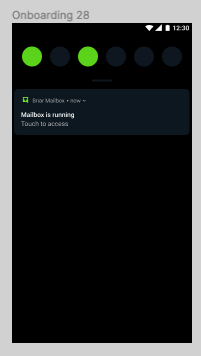
Check in the notification bar that the app is running
Check on the status screen that the app is running
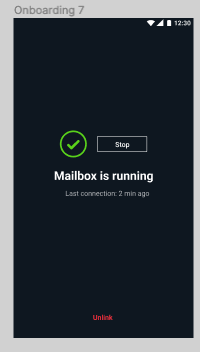
Then tap the stop button.
The application is not running any more.
User can restat the app successfully.
When restarting, the onboarding screens are not shown, nor is the battery saving screen (ie the do-not-kill-me fragment)
After a successful restart, the status screen shows 'app is running', and so does the notification bar when pulled down.
Check in portrait and landscape on different devices. Double tap the button as well.